WHATSAPP RESERVATIONS
Este módulo conecta la API de WhatsApp Business (a través de Twilio) con Alex Reservations, permitiéndote automatizar la comunicación con tus clientes.
WhatsApp se ha convertido en uno de los canales de comunicación más potentes para restaurantes.
Comparado con otros canales:
- Apertura en WhatsApp: 90-98%
- Apertura en SMS: alrededor de 80-90%
- Apertura en email: normalmente 20-40%
Los clientes ya pasan gran parte de su día en WhatsApp y están acostumbrados a comunicarse con negocios a través de este canal. Por eso, los mensajes suelen leerse en cuestión de minutos.
Esto convierte a WhatsApp en uno de los canales más efectivos para confirmaciones, recordatorios y comunicación operativa con clientes.
Con WhatsApp puedes:
- Enviar confirmaciones de reserva
- Solicitar reconfirmaciones
- Crear reservas directamente desde WhatsApp
- Gestionar conversaciones desde el dashboard
- Automatizar recordatorios, confirmaciones y reconfirmaciones
Otra gran ventaja es que los restaurantes pueden hacer campañas Ads-to-WhatsApp en lugar de enviar tráfico a una web.
En muchos casos esto convierte mejor, ya que el cliente puede iniciar la conversación directamente sin tener que navegar por una página web.
También puedes añadir un botón de “Reservar por WhatsApp” en tu web, permitiendo iniciar la reserva directamente desde el chat.
Cómo funciona
La integración de WhatsApp funciona en cuatro pasos:
- El cliente envía un mensaje a tu número de WhatsApp
- El sistema responde automáticamente con un mensaje de reserva
- El cliente abre el widget de reserva y crea la reserva
- La confirmación y los recordatorios se envían automáticamente por WhatsApp
WhatsApp Business App vs WhatsApp Business API
Alex Reservations utiliza la WhatsApp Business API para automatización.
Esto es diferente de la WhatsApp Business App que se usa en el móvil.
La mayoría de restaurantes utilizarán ambos:
WhatsApp Business App (móvil)
Para que el personal chatee manualmente con los clientes.
WhatsApp Business API (Twilio)
Para automatizar mensajes como:
- confirmaciones
- recordatorios
- reconfirmaciones
Esta separación es importante.
La API está pensada para automatización, mientras que la app está pensada para conversación manual.
1. Crear un WhatsApp Sender en Twilio
Para usar WhatsApp con Alex Reservations necesitas crear un WhatsApp Sender en Twilio.
Un WhatsApp Sender es el número que enviará y recibirá mensajes a través de la API.
Necesitas:
- Una cuenta en Twilio
- Un número de teléfono en Twilio
- Una cuenta de Facebook Business conectada a WhatsApp
Importante:
No puedes usar tu número actual de WhatsApp Business App para la automatización.
El número de la API se gestiona desde Twilio.
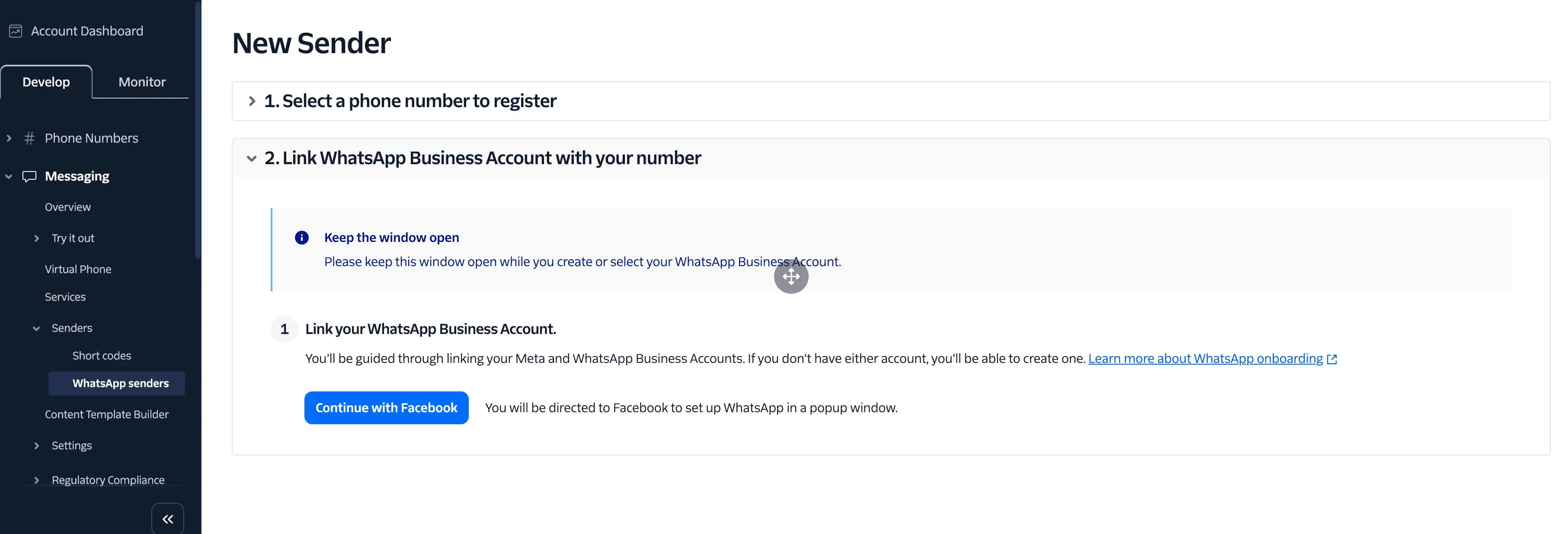
Una vez aprobado, puedes configurarlo en Alex Reservations.
2. Configurar Twilio en Alex Reservations
Este vídeo explica cómo conectar tu WhatsApp Sender de Twilio con Alex Reservations.
Configurarás:
- Account SID
- Auth Token
- Número de WhatsApp
- Webhooks
También hemos creado plantillas por defecto para que puedas empezar rápidamente.
Con un solo clic puedes generarlas en tu idioma y enviarlas a Twilio para aprobación.
3. Sincronizar plantillas de WhatsApp
WhatsApp requiere plantillas aprobadas antes de enviar notificaciones.
Este vídeo explica cómo sincronizarlas desde Twilio a Alex Reservations.
Pasos:
- Crear plantilla en Twilio
- Enviarla a aprobación en Meta
- Refrescar en Alex Reservations
- Verificar estado
Puedes usar las plantillas predefinidas o crear las tuyas.
4. Mapear plantillas a eventos
Debes asociar cada plantilla a un evento:
- Reserva pendiente
- Pendiente de pago
- Confirmada
- Reconfirmación
- Rechazada
- Cancelada
- No-show
- Feedback
- Recordatorios
Este vídeo lo explica.
5. Crear una reserva desde WhatsApp
Cuando un cliente escribe:
- El sistema responde automáticamente
- Incluye un enlace {book_now}
- Se abre el widget dentro de WhatsApp
- El cliente reserva
- Recibe confirmación automática
Esto mejora mucho la conversión.
6. Confirmar una reserva
Puedes enviar mensajes automáticos al cambiar estados.
Ejemplo:
- Reserva pendiente → confirmada → WhatsApp automático
7. Reconfirmaciones
Las reconfirmaciones reducen no-shows.
Estrategia típica:
- 1–2 recordatorios
- 1 reconfirmación antes de la reserva
8. Modo Agente vs Bot
Modo Bot
- Respuestas automáticas
- Flujos automáticos
Modo Agente
- Respuesta manual
- Conversaciones reales
Desde el dashboard puedes ver quién responde (bot o agente).