Best WordPress Restaurant Booking Plugins in 2026: How to Choose
The best WordPress restaurant booking plugin for a 30-seat bistro is rarely the best one for a group with six locations. Lists that rank ten products from first to last hide that fact. This guide takes a different route: it gives you the criteria to judge any WordPress restaurant reservation plugin, describes the four types of solution you will come across, and says plainly who each type suits. Alex Reservations appears as one option among them, with its limits stated.
Nine criteria for choosing the best WordPress restaurant booking plugin
Most disappointments come from a criterion nobody checked until the first busy Saturday.
1. Where the data lives
A reservation system collects names, phone numbers, emails, visit history and allergy notes. Ask where that information is stored. With some tools it sits in your own WordPress database. With others it sits on the servers of the provider, and in some cases the provider can also market to those guests. Know which one you are signing up for and how you would export the data if you left.
2. Commission model
There are three common ways to pay: a flat monthly fee, a fee per cover or per booking, or a mix of both. A per-cover fee looks small on one booking and large across a year. Multiply it by your real monthly covers before comparing it with a flat fee.
3. Table management
A booking form that only sends an email is not table management. Check whether the system knows your tables and their capacities, whether it can combine tables for larger parties, whether it prevents double bookings by itself, and whether staff can see the room on a floor plan or a timeline during service.
4. No-show tools
Look for automatic reminders by email or SMS, a re-confirmation request that guests answer with one tap, and the option to take a deposit or hold a card for large parties and special dates.
5. Payments
If you sell tasting menus, events or prepaid experiences, you need online payment at the time of booking. Check which payment gateways are supported in your country and whether the money goes directly to your own account.
6. Multi-location
One restaurant today can be three in two years. Ask whether a second location means a second installation, a second subscription, or just another entry in the same panel, and whether each manager can be limited to their own location.
7. Languages
A guest-facing form should speak the language of the guest. In tourist areas that means several languages, including the confirmation emails, not only the form labels.
8. Support
Find out who answers when something breaks at 7 pm on a Friday, in which language, and through which channel.
9. Price model
Free, freemium, flat subscription, per location, per cover. Check what the free tier actually includes, whether there is a trial of the paid plan, and whether there are setup fees or minimum contract terms.
The four types of restaurant booking solution for WordPress
Almost every option you find falls into one of these four groups.
Simple form plugins
A general contact form or appointment form adapted to ask for date, time and party size. The request arrives by email and someone confirms it by hand.
Suits: very small venues with a few bookings a week, or places that only take reservations for occasional events.
Does not suit: any restaurant where two requests for the last table can arrive within the same hour. There is no live availability, so the guest never gets an instant answer and staff carry the risk of overbooking.
Dedicated WordPress restaurant reservation plugins
Plugins built specifically for restaurants: shifts, tables, capacities, live availability, confirmations and reminders, all managed from the WordPress dashboard. The booking happens on your own site.
Suits: independent restaurants and small groups that already have a WordPress site, want direct bookings under their own brand and are comfortable keeping WordPress updated, or have someone who does it for them.
Does not suit: restaurants without a WordPress site, or owners who want a third party to bring them new diners.
External SaaS widgets embedded in WordPress
A reservation platform hosted by the provider, with a widget or iframe that you paste into a WordPress page. The data and the management panel live outside your site.
Suits: larger operations that want a hosted product with integrations to point-of-sale systems and do not mind a higher monthly cost.
Does not suit: owners who want everything in one dashboard, or who prefer guest data to stay in their own database.
Marketplaces
Consumer-facing portals and apps where diners search for restaurants and book. Your restaurant is listed next to others.
Suits: new restaurants and venues in tourist areas that need discovery more than margin.
Does not suit: established restaurants whose regulars already know them. Paying a third party for a guest who was going to book anyway is hard to justify. The article on alternatives to booking marketplaces covers this trade-off in detail.
Where Alex Reservations fits
Alex Reservations belongs to the second type. It is a WordPress restaurant booking plugin that installs from the WordPress plugins screen, works with any theme and page builder, and stores reservations and guest data in the WordPress database of the restaurant. There is no commission and no per-cover fee.
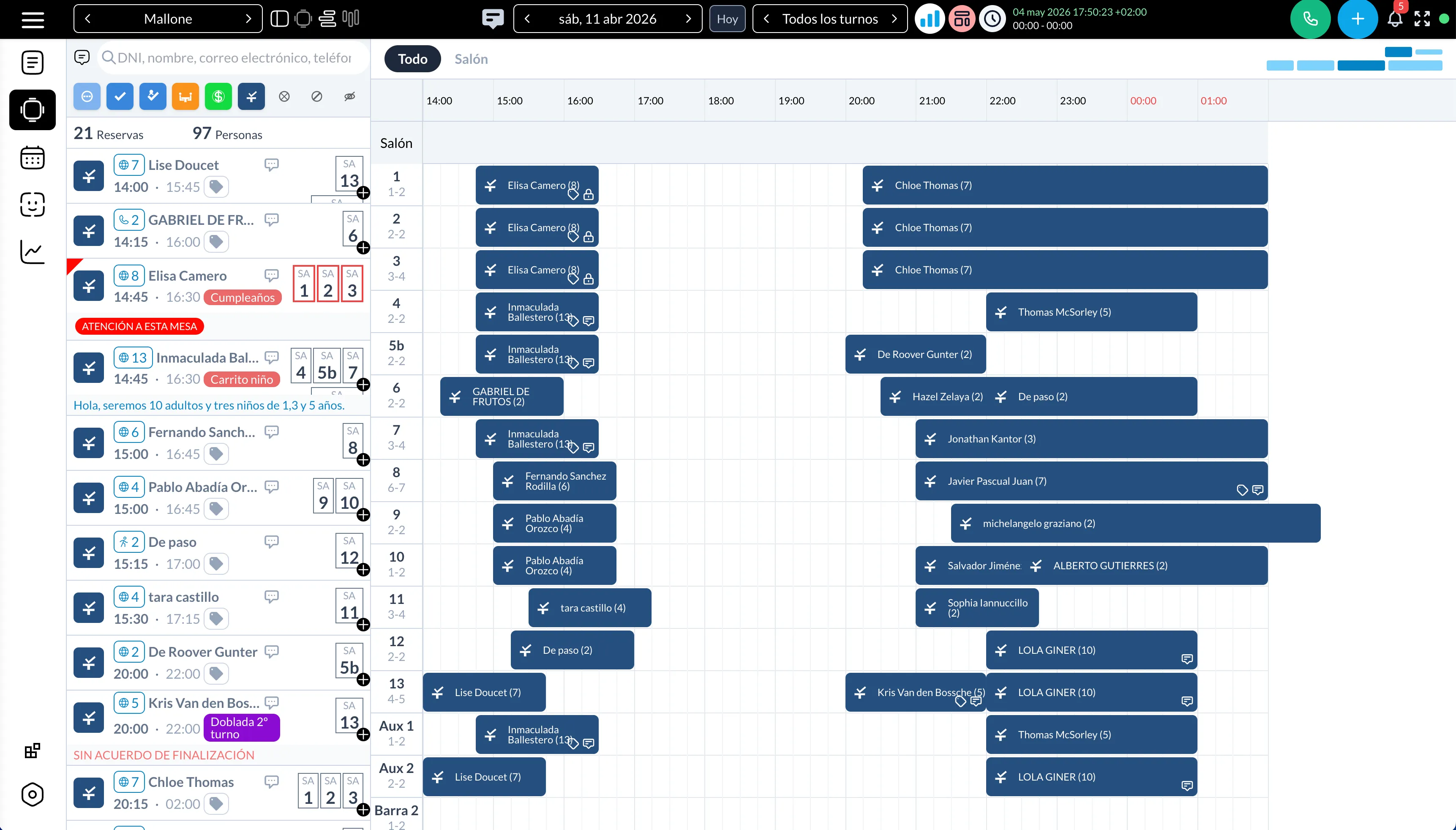
What it does, by plan:
- Free version: one restaurant, up to 30 bookings per month, bookings list, monthly and weekly views, a simple customer CRM, tags, shifts, email templates and the booking widget.
- PLUS plan: €49 per restaurant per month, with a 14-day free trial and no credit card. It adds unlimited bookings, multiple restaurants, user roles, a drag-and-drop floor plan, timeline views, area and table selection by guests, email and SMS reminders, automatic re-confirmation, deposits and online payments through Stripe, PayPal and other gateways, events, reports, review requests, white label and 23 languages.
- Optional modules, priced separately: WhatsApp Reservations, Missed Call Booking, Premium Tables, Booking Offers, API & Bots and Gift Cards.
The plugin is rated 4.9 on WordPress.org and is used by more than 500 restaurants in over 20 countries. Current prices are on the pricing page.
Who it is not for
- Restaurants that do not use WordPress and do not plan to.
- Owners who expect the reservation system to send them new diners. It is a tool for your own website, not a marketplace.
- Venues with more than 30 bookings a month that need a permanently free tool. Above that volume you need the paid plan.
- Teams with nobody willing to keep WordPress, the theme and plugins updated.
A short checklist before you decide
Use this table with any product you are considering. If the product page does not answer a row, ask support before installing.
| Question | Why it matters |
|---|---|
| Is guest data stored in my own database, and can I export it? | You keep the relationship with your guests if you switch tools |
| Do I pay a flat fee or per cover? | Per-cover fees grow with your success |
| Does it prevent double bookings with real tables? | Removes manual checking during service |
| Does it send reminders and ask for re-confirmation? | Fewer no-shows without phone calls |
| Can it take deposits through my own payment account? | Protects large tables and special dates |
| Can I add a second location in the same panel? | Avoids a migration when you grow |
| Is there a free tier or trial without a card? | You can test with real bookings before paying |
Next step
Pick the two or three criteria that matter most for your restaurant and test one tool against them with real bookings for two weeks. If a dedicated plugin is the type that fits, the guide on how to add a table booking system to WordPress walks through the set-up, and you can start the free 14-day trial without a credit card.