Automatic Table Combinations: Seat Large Parties Without Creating Every Group by Hand
A restaurant with twenty identical tables can join any six of them for a party of twelve. The staff does it every weekend without thinking. An online reservation system cannot do it unless somebody has listed, one by one, which tables may be joined. Alex Reservations now has automatic table combinations: you write one rule, and the system finds free tables to combine for each group reservation.
The problem with combining tables by hand
Most restaurant reservation systems handle joined tables as fixed groups. You tell the system that table 4 and table 5 can be joined for six guests, then table 5 and table 6, and so on. That works in a room with a few combinations.
It stops working when the tables are interchangeable. The number of possible combinations grows very fast:
| Tables joined | Combinations with 20 tables |
|---|---|
| 2 | 190 |
| 3 | 1,140 |
| 4 | 4,845 |
| 5 | 15,504 |
| 6 | 38,760 |
Nobody creates 38,760 groups. What happens in practice is that the restaurant sets up a handful of combinations and hopes for the best. When those few are taken, the booking form says "no availability" for a party of ten, even though half the room is empty. The guest books somewhere else, or calls, and the staff solves by phone what the software could not.
One rule instead of thousands of combinations
An automatic group is a rule with three parts:
- Which tables can be combined with each other.
- How many of them are joined for one reservation.
- For how many guests, as a minimum and a maximum.
"Any 2 of these 16 tables, for 4 to 8 guests" is a complete rule. It covers 120 different pairs, and you never see them listed. The system does not generate the combinations. It only checks, at the moment of each reservation, whether enough tables in the rule are free at that time.
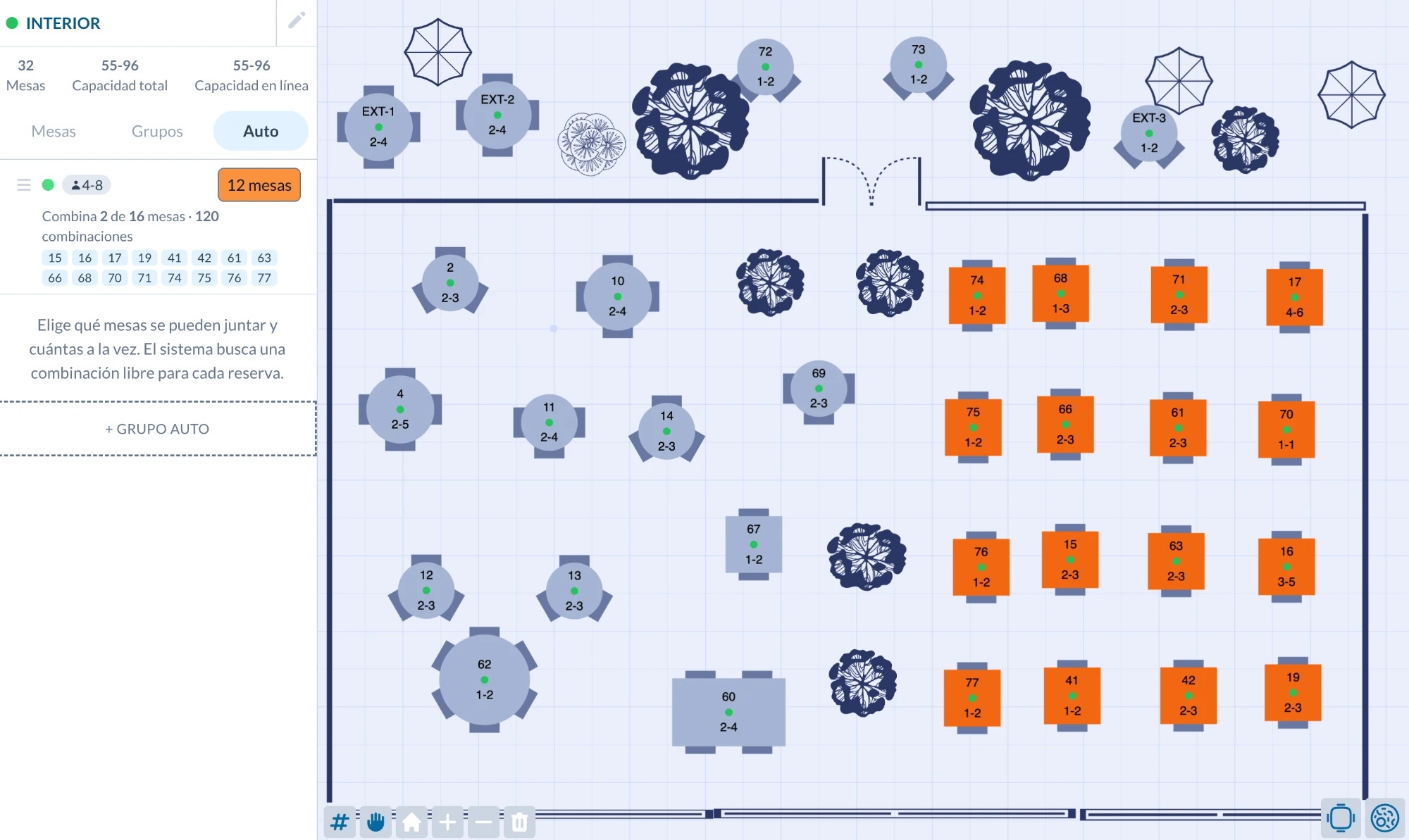
You create the rule in the floor plan editor, in a tab called Auto next to the tabs for tables and manual groups. You can have several rules in the same room, for example one for pairs and another for large parties, and a table can belong to more than one.
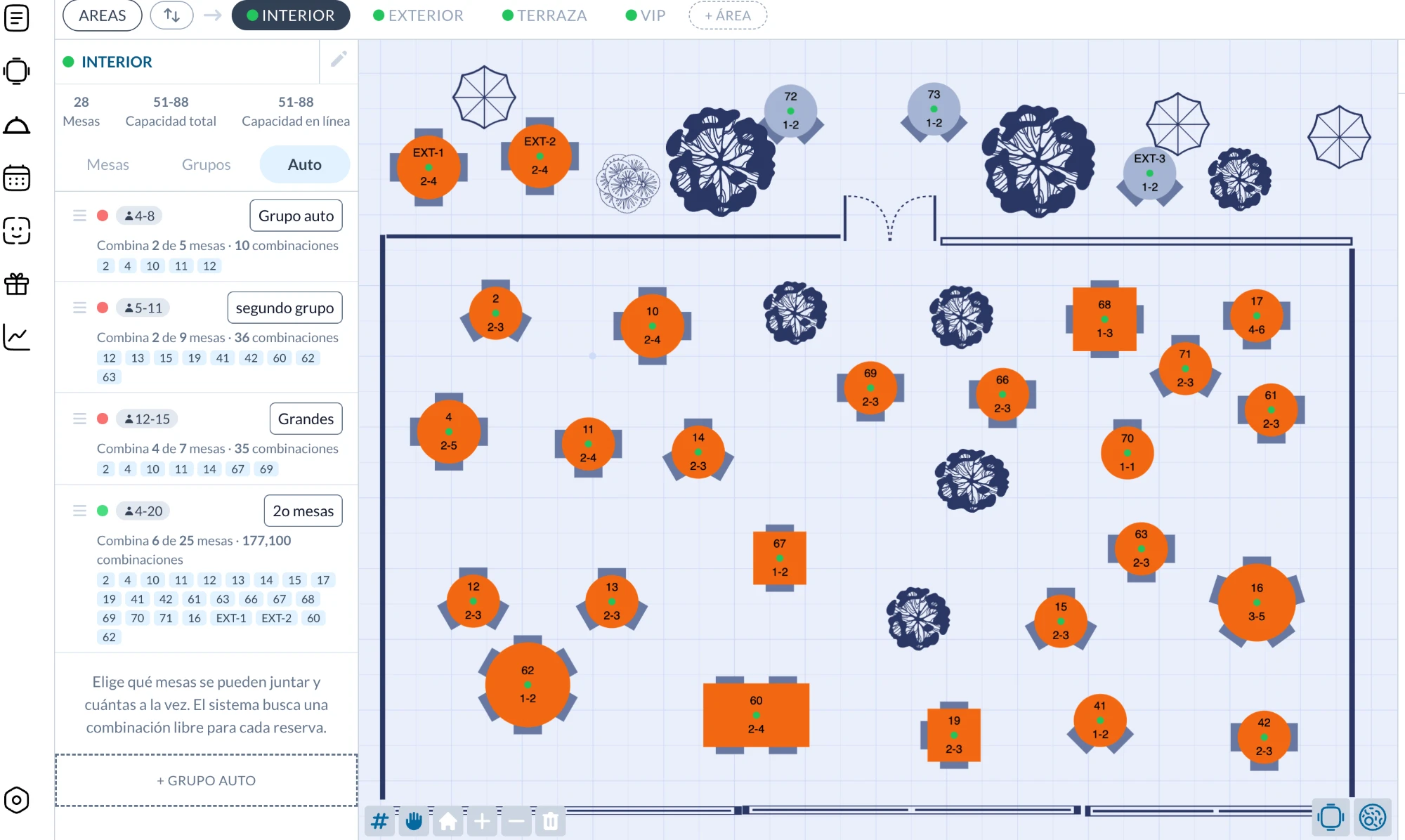
One of the rules in this screenshot combines 6 tables out of 25. That is 177,100 combinations from a form that takes a minute to fill in.
Which tables does the system choose?
Three things decide it.
Single tables come first. The system looks for one table where the party fits, then for a manual group, and only then for an automatic group. A party of five does not take two tables if a table for five is free.
The smallest rule that fits wins. If two rules accept the party size, the system uses the one with the lower maximum capacity, so the large combinations stay free for the large parties.
The tables are close to each other. Among the free tables of a rule, the system picks the ones that are nearest on your floor plan. If you rearrange the room and save the plan, the next reservations follow the new positions.
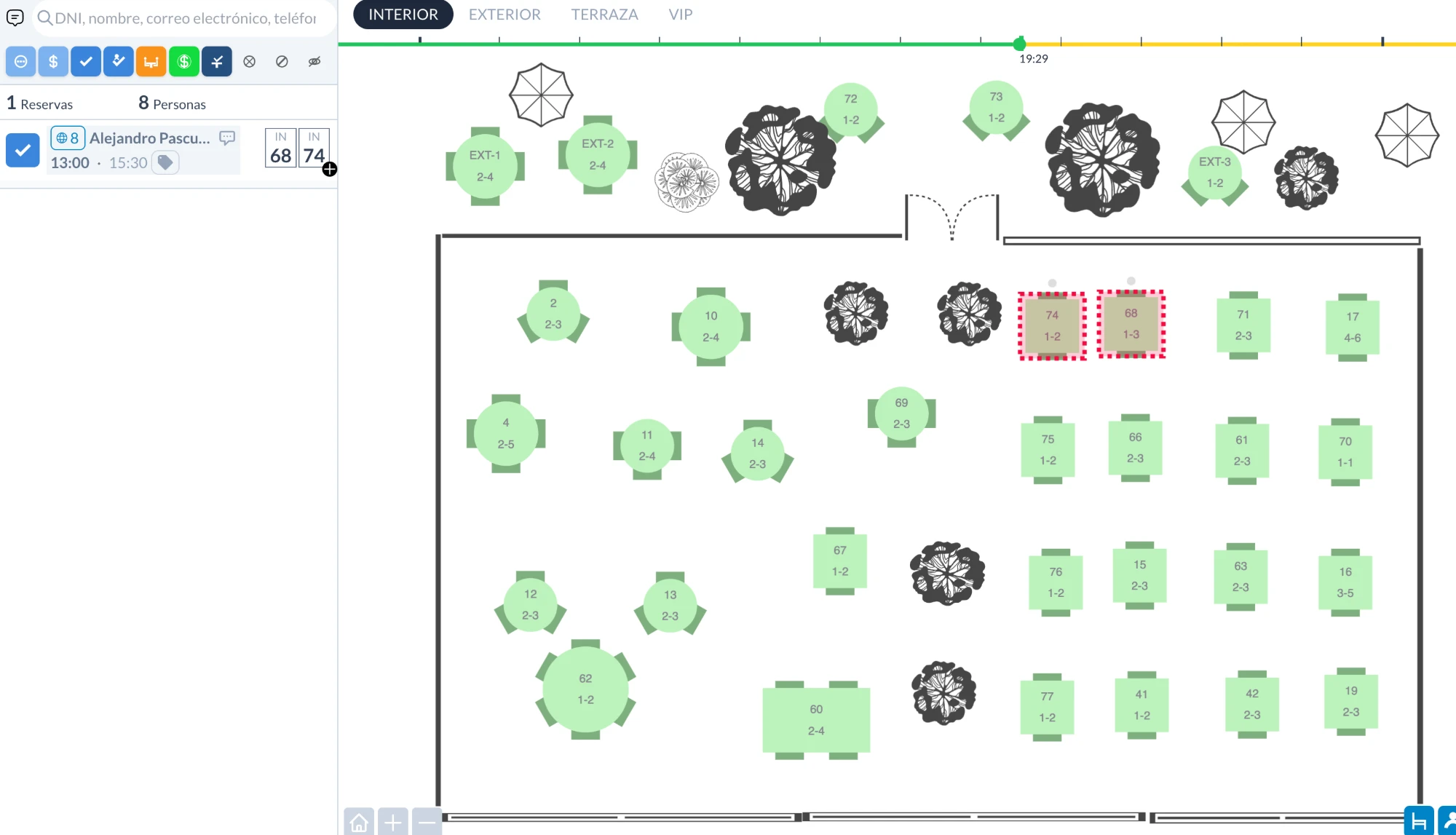
Here is one lunch service with the rule above. The first party of 8 gets tables 68 and 74, side by side.
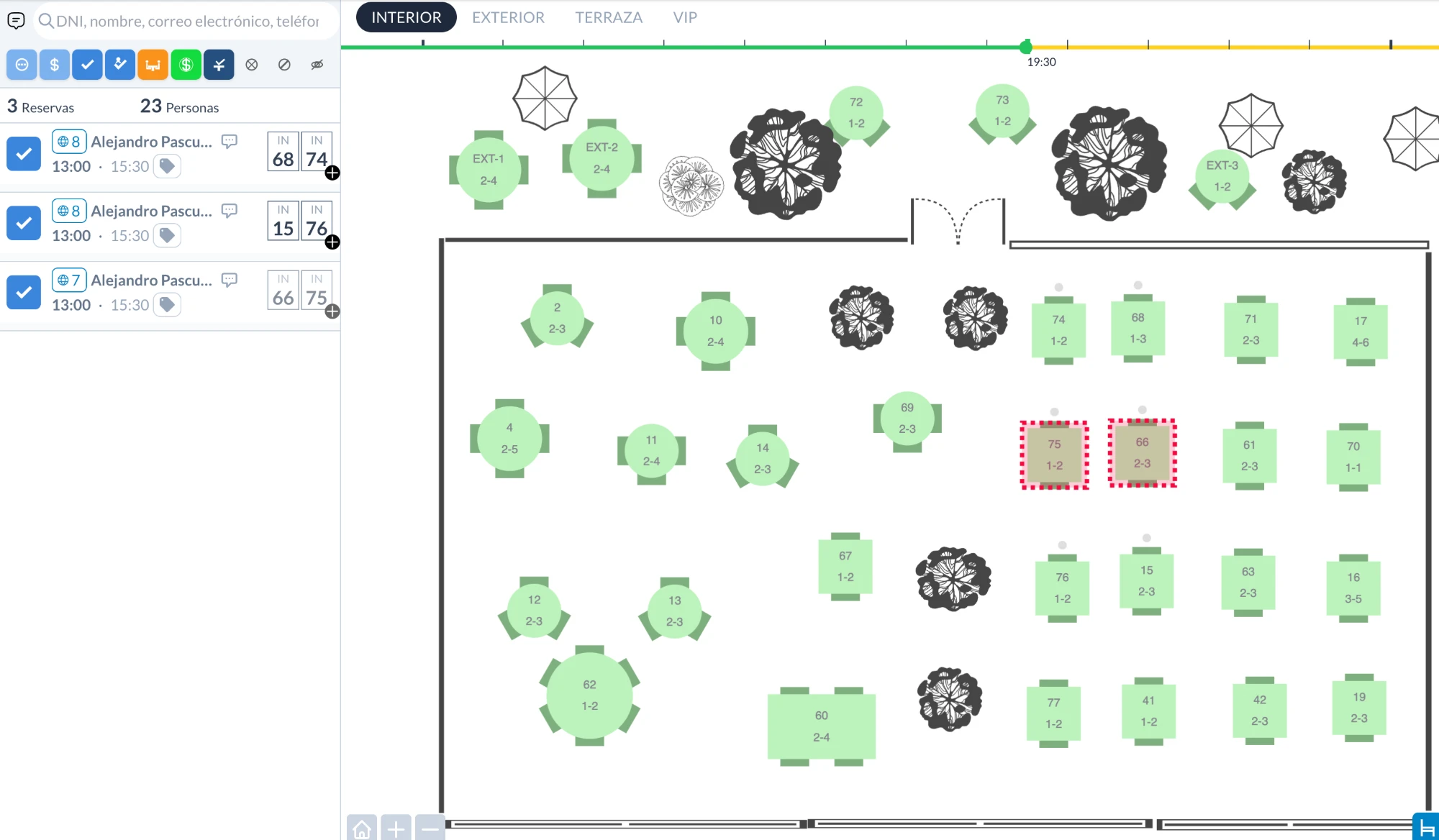
A second party of 8 at the same time gets a different pair, and a party of 7 gets a third one.
Then a party of 5 arrives. It fits in table 16, so it gets that table alone. The next party of 8 gets another pair.
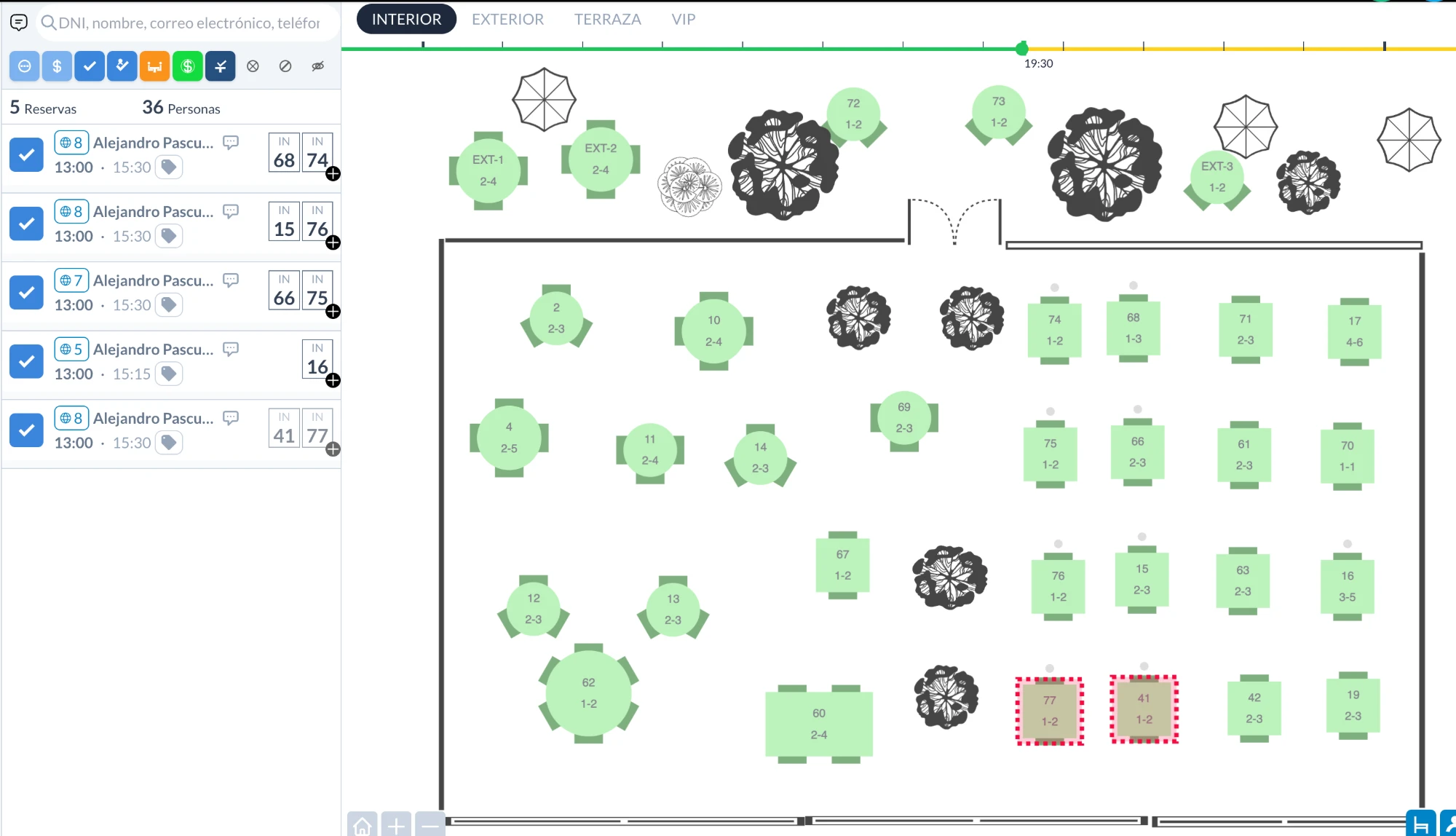
Nobody assigned those tables. Five online reservations came in and each one landed on tables that make sense in the room.
Large parties
The same rule works for bigger groups. This reservation for 12 guests sits on six tables that the system joined on its own.
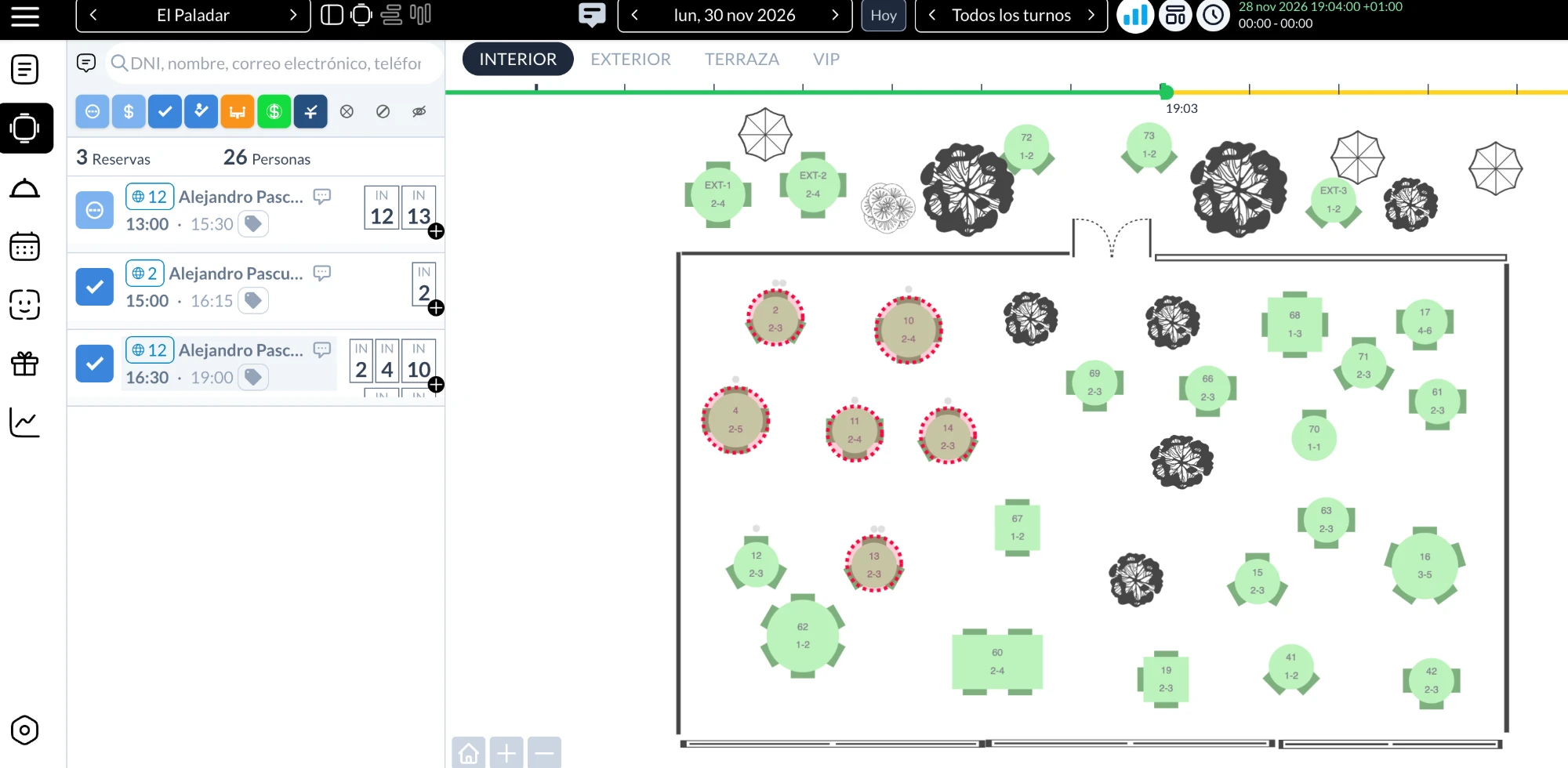
For the restaurant this means that a group reservation is accepted online whenever the room can really seat it, and refused only when it cannot.
What changes in daily work
- Fewer lost group bookings. The form stops saying "no availability" when there are free tables that could be joined.
- Less setup. A rule replaces hundreds or thousands of manual groups, and you do not have to maintain them when you add a table.
- Fewer phone calls. Parties of eight or ten can book online like a table for two.
- A room that fills in order. Joined tables are neighbours, and small parties do not take the combinations that large parties need.
Who is it for?
It helps most in rooms with many similar tables that can be moved: banquet halls, terraces, beer halls, canteens, restaurants with rows of tables for two or four, and any place that takes group bookings regularly.
If your room has only three or four fixed combinations, manual groups are still the simplest way, and both systems work together. The system tries your manual groups before the automatic ones.
How it fits with shifts
There is nothing to select in the shift. In the "All Tables" mode every active rule is used. In the "Some Tables" mode a rule only combines the tables that the shift offers, so a table you keep out of a shift is never joined in that shift. Each rule also has its own switch for online booking, in case you want to stop offering a combination online for a while.
The step-by-step instructions are in the documentation: Automatic table combinations.
Next step
If you already use Alex Reservations, open the floor plan editor, go to the Auto tab and create your first rule with the tables you join most often. If you are still looking for a restaurant reservation system for WordPress that handles group bookings, the feature list shows what is included, and the table management page explains the floor plan in more detail.